
04 Dec 2023
-
The Composite Design Pattern allows us to have a tree structure and ask each node in the tree structure to perform a task. That means this pattern creates a tree structure of a group of objects. The Composite Pattern is used where we need to treat a group of objects in a similar way as a single unit object.
-
In simple words, we can say that the composite pattern composes the objects in terms of a tree structure to represent part as well as a whole hierarchy. The composite design pattern is used when we need to treat a group of objects in a similar way as a single object.
-
Composite Object: A composite object is an object which contains other objects.
-
Leaf Object: The object which does not contain any other objects is simply treated as a leaf object.
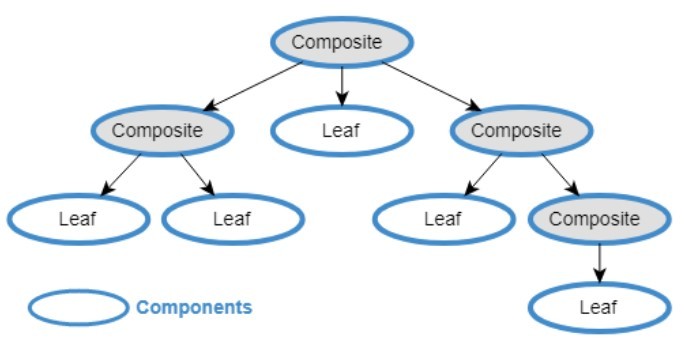
key points of the Composite Design Pattern:
-
Intent:
- The main intent of the Composite pattern is to compose objects into tree structures to represent part-whole hierarchies. It allows clients to treat individual objects and compositions of objects uniformly.
-
Key Components:
- Component:
- Declares the interface for objects in the composition. It defines operations that are common to both leaf and composite objects.
- Leaf:
- Represents the individual objects in the composition. It implements the operations declared by the Component interface.
- Composite:
- Represents the composite objects in the composition. It contains leaf elements and may have additional operations. It implements the operations declared by the Component interface.
- Component:
-
Tree Structure:
- The composite pattern organizes objects into a tree structure where both individual objects (leaves) and compositions of objects (composites) are treated uniformly.
-
Recursive Composition:
- Composites can contain both leaves and other composites, allowing for a recursive structure where a composite may have sub-composites and leaf elements.
-
Uniformity:
- Clients can treat individual objects and compositions of objects uniformly. They can interact with both leaves and composites through the common Component interface.
-
Transparency:
- The composite pattern provides transparency to the client, meaning the client is unaware of whether it is dealing with an individual object or a composition of objects.
-
Advantages:
- Flexibility: The pattern provides a way to work with tree structures of objects in a uniform manner.
- Simplified Client Code: Clients can treat individual objects and compositions uniformly, which simplifies client code.
- Scalability: The pattern supports the addition of new types of components without modifying existing code.
-
Use Cases:
- The Composite pattern is useful when clients need to treat individual objects and compositions of objects uniformly.
- It is applicable when working with tree structures, such as representing the hierarchy of graphical elements in a user interface.
Example:
- Consider a graphics system where you have simple graphical elements like circles and rectangles (leaves) as well as more complex elements like groups of shapes (composites). The Composite pattern could be used to represent the entire hierarchy.
